Someone Walks In?
Hide Your Screen
In Under 1 Second.
Never panic over unexpected shoulder surfers, nosy colleagues, or family members walking behind your desk. Force personal conversations, shopping lists, or confidential tabs to vanish instantly. One quick hotkey blanks your display, saves your exact place, and locks everything away safely.
See Panic Defense in Action
Watch this 60-second operational walkthrough to see exactly how Tab Hider intercepts exposure events and secures your workplace workspace environments instantly.
Designed to remain unseen.
Take a look inside the extension dashboard interface configurations, shortcut layouts, and localized client-side vault controls.
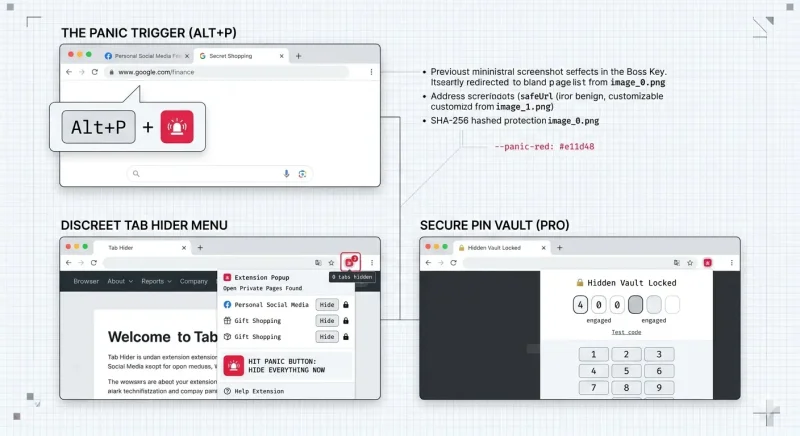
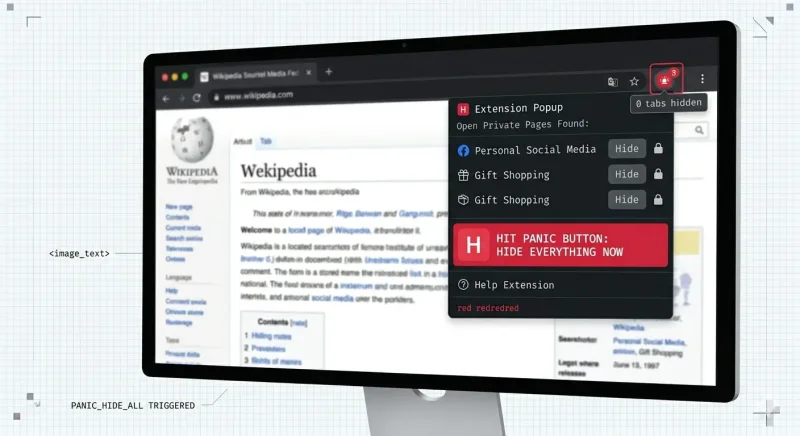
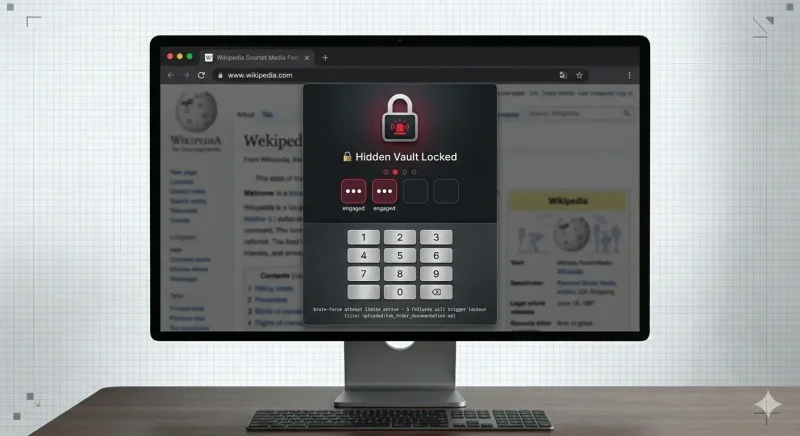
Absolute Panic-Defense Controls.
Unshakable, simple privacy tools engineered to rescue you from sudden, uncomfortable real-world scenarios.
The Universal "Boss Key" Hotkey
When a crisis strikes, there is no time to individually click and close separate windows. Pressing your instant quick keys immediately drops all target screens into the lockbox, replacing them with an completely unsuspicious, boring business summary layout instead.
Password-Locked Screen Shield
Hiding your pages is only half the battle. Tab Hider locks your swept information securely out of view behind a quick numerical entry grid. Even if someone takes over your computer chair a second later, they cannot see or recall what you were looking at without your code.
Walk-Away Panic Lock (PRO)
Forgot to hide your screen before stepping away? The system automatically senses when your mouse and keyboard inputs hit a 60-second absolute zero drop and instantly engages the emergency lockbox automatically.
Approved Safe-List Filters (PRO)
Maintain the perfect disguise layout. Choose your real work tools, news feeds, or educational documents to stay open, ensuring your browser screen looks incredibly natural when the sweep completes.
Anti-Spy History Eraser
A classic way people snoop is checking what you just opened a minute ago. The second you trigger the panic shield, the app cleanses any matching recent entry paths from your browser history ledger entirely.
Why & When to Use Tab Hider
Tab Hider is built to eliminate the physical anxiety of working in common open areas, shared households, or high-traffic offices by providing a flawless shield of defense.
Stealth, Privacy & Productivity
Stealth and Privacy
Instantly hide sensitive pages (e.g. banking, shopping, personal chats) from prying eyes with a single keystroke.
Productivity & Focus (Tab Stashing)
Stash temporary research tabs to declutter the tab strip without losing URLs, keeping browser memory down and focus high.
Trace-Free Browsing
Automatically wipes stashed tab URLs from the local browser history so they cannot be retrieved by looking at history logs.
Incognito Compatibility
Fully supports incognito tabs, stashing them securely and reopening them back inside an incognito environment.
Real-World Panic Protection
Shared & Public Spaces
Working in an office, co-working space, or coffee shop where colleagues or strangers might walk by or look at your screen.
Screen Sharing & Presentations
Presenting a window on Zoom, Teams, or Meet, where you need to hide personal or unrelated tabs before starting.
Sudden Interruptions (Panic Moments)
When someone approaches your desk and you need to hide all non-work tabs instantly with a single keyboard stroke.
End of Day & Context Switching
Switching from one project to another? Stash all current project tabs and start fresh, knowing they can be restored in one click.
The 4-Step Technical Workflow
Press Alt + H to stash the current active tab or Alt + P for a bulk panic hide. A decoy URL loads instantly so the browser window stays open.
Stashed URLs are deleted from local history. Whitelisted safe-list domains (Pro only) are spared to maintain a natural work display.
Tabs are stashed chronologically. Pro features block access with a 4-digit PIN (SHA-256 hashed), triggering a 5-minute lockout after 5 fails.
Press Alt + S or click to restore. Incognito tabs reopen inside incognito windows. Icon badge count decrements.
Choose Your Defense Level
Deploy the exact privacy barrier configuration that fits your personal comfort needs.
$0 / free forever
- ✓ Hide Single Tab (Alt+H or popup button)
- ✓ Restore Last Hidden (Alt+S or popup button)
- ✓ Stealth History Eraser (Deletes URL from history)
- ✓ History Toggle (Option to keep history)
- ✓ Bulk Restore ("Show all" button)
- ✓ Clear All Stashed (Wipe all hidden tabs)
- ✓ Incognito Support (Reopens in incognito)
- ✓ Export URLs (Copy stashed titles & links)
- ✓ Panic Button Decoy (Opens default decoy URL)
$3.99 / month
- ✓ Everything in Free Tier included
- ✓ Customizable Decoy / Safe URL (Redirect target)
- ✓ Safe-List Whitelist Protection (Domains excluded)
- ✓ Popup Access Lock (Requires 4-digit PIN)
- ✓ Locked Stashed Tabs (Masks titles/favicons)
- ✓ Automatic Idle Hide (Auto-hides on inactivity)
- ✓ Premium License Key Activation
- ✓ Priority Support Lane
Frequently Asked Questions
Straightforward answers about your privacy, hotkeys, and data safety bounds.
chrome://extensions/shortcuts in your browser address bar and choose a shortcut combination that fits your setup perfectly.
Get in Touch
Have a question about Tab Hider, your subscription, or a feature request? Drop us a message and we'll get back to you within one business day.